
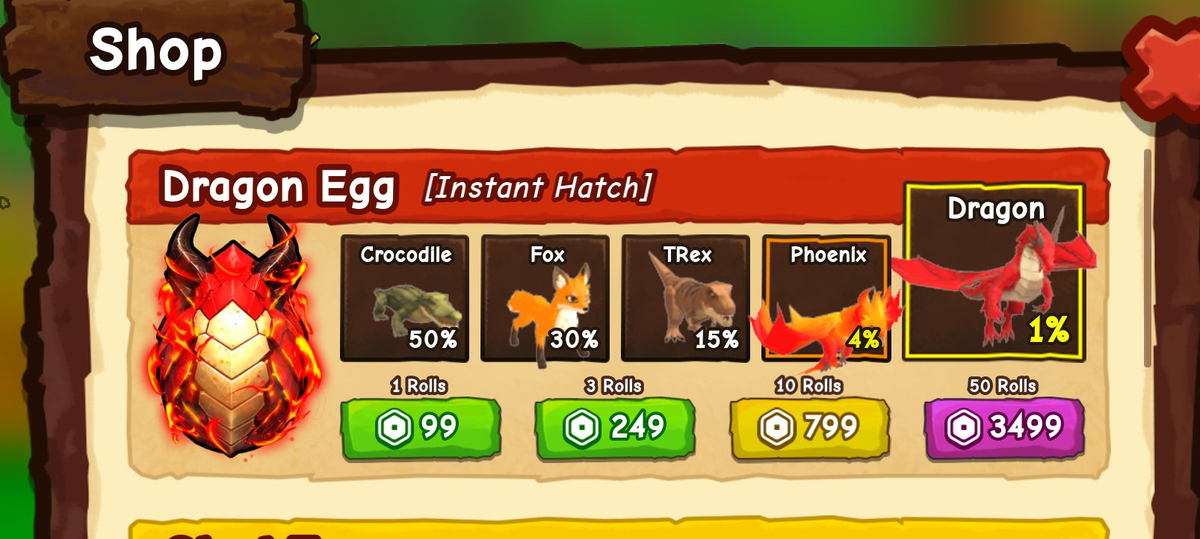
A published Shop screenshot shows Dragon Egg [Instant Hatch] with five possible pets, including Dragon. A separate acquisition guide reports a Galaxy Egg world-hunt route, but we have not verified that route through a complete recorded hatch. Treat the Shop pool as a documented interface example and the Galaxy route as a lead to check in the current game.12
The name on the shop product does not mean every result will be a Dragon. Third-party pool lists sometimes include other pets such as Fox; read the live card in your shop rather than a copied percentage table.
Reported world route: check Galaxy before committing
The Galaxy-to-Dragon claim comes from secondary reporting, not a hatch we have independently observed. Confirm the current egg information before spending time on a long run.1
Get onto a pet you can control well and leave room in your basket. Check Track for a Galaxy Egg listing and read its current requirement. At the egg itself, inspect the labelled pickup requirement before attempting the interaction.13
Have the trip home in mind before chasing a distant target. If reaching it already stretches your mount's travel ability, work on getting faster and take a more manageable egg run first.
When you locate a Galaxy Egg, confirm its name and follow its collection and hatch prompts. If the egg enters your basket, head to your ranch while watching any transport warning. Use the nest walkthrough for that carried-egg flow.
Check the actual pet result after the hatch. A different pet is still worth inspecting for movement or income; it simply means this hatch did not produce your Dragon.
If Galaxy is unavailable, continue ordinary runs or improve your plot instead of waiting at one empty spot. Use egg locations to learn landmarks, not as a fixed Galaxy spawn map.
Shop route: read what one purchase contains
Open Shop and find Dragon Egg [Instant Hatch]. Inspect the possible results before choosing a purchase option. The published Shop screenshot shows this reward pool:2
| Possible result | Percentage displayed |
|---|---|
| Crocodile | 50% |
| Fox | 30% |
| T-Rex | 15% |
| Phoenix | 4% |
| Dragon | 1% |
The screenshot also displays 1, 3, 10 and 50 rolls beside prices of 99, 249, 799 and 3,499, with a Robux-style currency symbol. These are values in a third-party screenshot reviewed on September 18, 2026, not a live price check. Read the current Shop and final purchase prompt before spending. This evidence does not establish guaranteed results, a pity system, or Shop exclusivity.
Read three things together: the result pool, the number of rolls, and the total price with its currency. A bundle count describes attempts, not copies of the pet pictured on the card.
If you choose this route, decide on a spending limit first. Review the final purchase prompt, then inspect the results before considering another bundle. Stop at your limit even when the previous hatch was disappointing.
If the purchase appears unfinished, check your pet list and purchase state before repeating it.
Use the Index for discovery, Pets for your usable result
After a hatch, open Index: Pets to check collection progress. Then find the result in your own Pets list before planning around riding or placing it.
Use SpaceQT at 3:40 to locate the Index tabs. A silhouette is not enough to identify a Dragon you own.
- Galaxy: world-egg interaction
- Dragon Egg: Shop rolls
- Inspect the actual result
The first two boxes are alternative routes. Neither guarantees a Dragon.
Which step is holding you up?
Cannot reach the egg: improve the mount or approach before investing in another long search.
Can deliver eggs but have not hatched Dragon: keep useful results and choose whether to continue the world route; another purchase is optional.
Got the pet: compare its current stats for the role you need, then read pet mutations for another improvement path.
Gameplay reference
Use these chapters to recognize the relevant controls. The recording illustrates the interface; follow the written steps for this task.
Ride A Pet: a tour of the controls and collection Index
Video by SpaceQT
Use this walkthrough to recognize the ranch, riding controls and Index. The creator is playing on an established account.
Use YouTube’s Play button to watch here.
Playback starts in YouTube’s own controls. Selecting a different video does not play it. Reloading stops the current video.