
Opening the shop or buying the item does not start the search.1 Equip the radar and press Use Radar before you follow a marker. Recorded prices and stock below are from those videos; the Gears row in your session is the one to buy.
Check your basket and the available egg listings before spending. Search equipment is most useful when you are ready to finish the trip.
Choose the hunt before the purchase
Visit Track Eggs in World and read the list. Check the target's luck requirement before planning around it. Resolve a requirement you cannot meet rather than buying another tool and hoping it bypasses the restriction.
Compare Track at 5:30 with the egg list at 5:35 in ItzVexo's recording.
Then open Gears. Read the item name, its description, the price, and stock. Choose within your budget; a rarity label alone is not enough reason to spend more.
After a content drop, reread Track and Gears before buying the radar you used yesterday. The update record records the prior MUTATIONS window and the next listed event; this page still uses older shop recordings.
Recorded radar names
These names appear in the gameplay frames used on this site. They help you recognize a Gears row. They are not a live stock list, and they are not a ranked ladder.
| Recorded item | What the frame shows | What it does not prove |
|---|---|---|
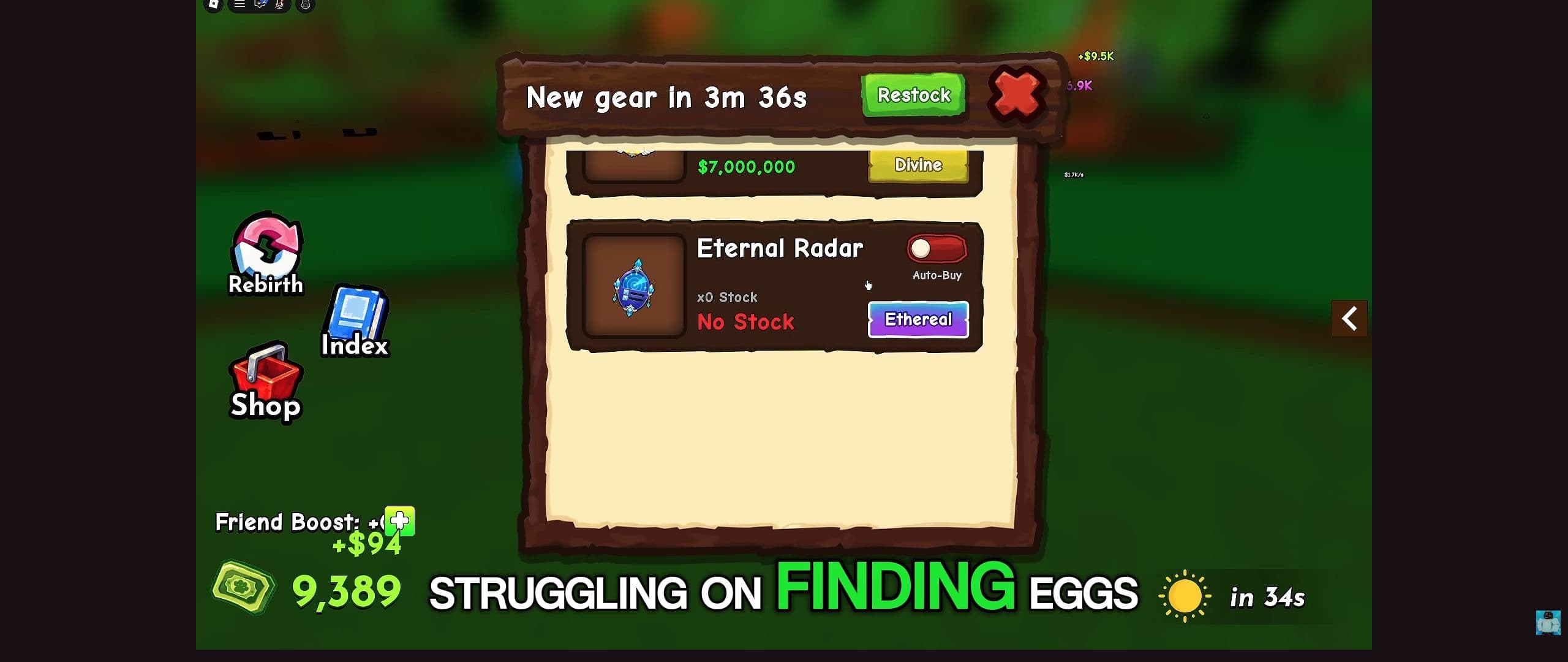
| Eternal Radar | Item name Eternal Radar, rarity Ethereal, x0 Stock / No Stock in ItzVexo at 5:45 | Current price, restock time, or that it is the best radar |
| Royal Radar | Marked Legendary at $20,000 in SpaceQT at 3:07 | That this price is still on the card |
| Magic Radar | Marked Mythic in the same SpaceQT shop frame | Current stock or a guaranteed egg |
| Advanced Radar, Jewel Radar | Named on the mechanics Gears note | A complete radar roster |
If your shop shows a name that is not in this table, use that live row. Do not wait for this page to invent a match.
Read a sold-out listing correctly
At 5:45 in ItzVexo's video, Eternal Radar is the item name and Ethereal is its rarity label. The row shows x0 Stock and No Stock. That listing was sold out in the recording.
For your purchase, use your own shop's stock and restock countdown. If the item is unavailable, finish a hatch or collect plot earnings while waiting. Read any optional restock or AutoBuy prompt before enabling it.
Activate, navigate, and collect
Equip the purchased radar and select Use Radar. Read the target guidance that appears. Ride toward it, but use terrain and landmarks to choose your approach.1
Near the target, slow down. A marker can point above, below, or behind the surface you first see. Reposition until the egg's interaction is accessible, then check that your basket changed after pickup.2
Head home with the egg. Use hatching eggs for the nest step; use egg locations when you need a recognizable approach through the landscape.
When a search stalls
No Use Radar action: check that the radar is equipped.
A marker but no visible egg: check elevation and nearby cover, then read any message about the target becoming unavailable.
An egg you cannot collect: check basket space and the displayed requirement before purchasing anything else.2
Repeated scans will not fix a full basket. For an interaction that remains stuck, use troubleshooting.
Radar questions before another run
Where do I buy a radar? Open Gears and read the current item row before spending. The recorded Royal Radar price and Eternal Radar stock above show what those particular videos displayed; neither is a promise about today's shop.
Does a radar guarantee an egg? No. Track can show a requirement you cannot meet, and the route can still fail if the target becomes unavailable or the basket is full. Check the target and carrying space before starting.
Why does the marker lead to an empty spot? First check the ground above and below the marker, then move around nearby cover. If the egg interaction never appears, read the game's message and use the troubleshooting steps rather than buying another radar immediately.
Shop note: Prices, stock, and restock countdowns in a recording are historical. Use the listing in your current session.
Gameplay reference
Use these chapters to recognize the relevant controls. The recording illustrates the interface; follow the written steps for this task.
Ride A Pet: the Track and Gears shops
Video by ItzVexo
A visual reference for world egg tracking and the shop interface. Check current in-game prices before buying.
Use YouTube’s Play button to watch here.
Playback starts in YouTube’s own controls. Selecting a different video does not play it. Reloading stops the current video.