
Finding the egg, carrying it, and hatching it are separate steps. A Track row or a landmark is a place to look, not a pet you already own. Hatch rates and a full spawn list are not published on this page.
| Egg | Hunt | Evidence |
|---|---|---|
| Blackhole EggBlack Hole Egg | Track, then Giant Tree or waterfall caveConfirm the live egg label before pickup | Reported |
| Cherub Eggangel egg | Same published search areas as BlackholeMatch the name on the egg, not a color | Reported |
| Galaxy Egg | World hunt when Track lists GalaxyA Galaxy hatch is not a guaranteed Dragon | Recorded screen |
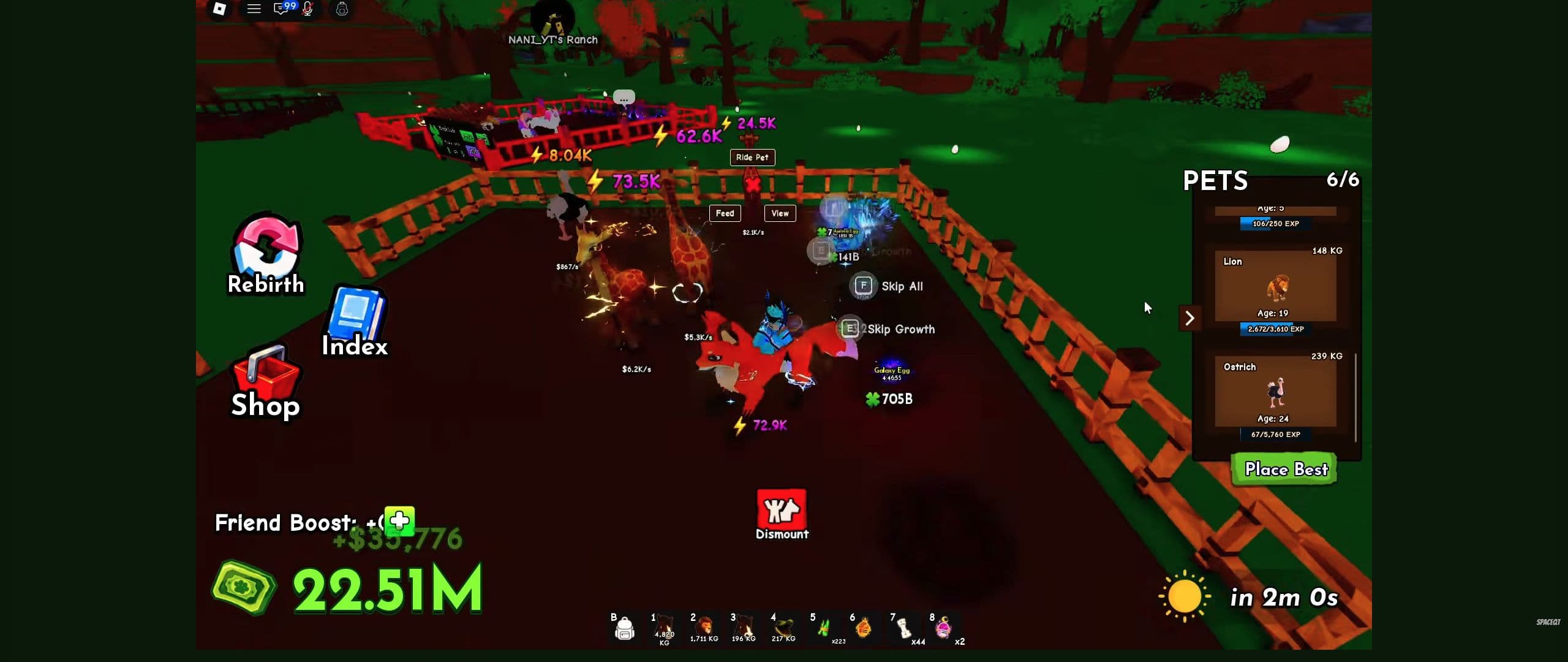
| Aurora Egg | Recorded growing at a ranch nestFinish that egg’s growth before expecting a pet | Recorded screen |
| Dragon EggDragon Egg Instant Hatch | Shop product, separate from world Galaxy huntsRead the live reward pool before paying | Reported |
| Flame Egg | Named in official promotional artworkCheck the current shop offer, not the poster | Reported |
Which egg screen are you looking at?
| Screen or label | The question it answers |
|---|---|
| Track / eggs in the world | What is currently listed in the world? |
| Radar marker | Where is the target of this search? |
| Egg Basket | What are you carrying right now? |
| Hatch or result screen | What stage has this particular egg reached? |
| Index: Eggs | What have you collected? |
A target on a list does not mean the egg is already yours. Confirm each transition before moving to the next part of the run.
Choose a search you can finish
Start close enough to recognize the way home. At the Gears shop, compare the available radar's name, price and stock with the cash you are willing to spend on this attempt.
Follow its marker and inspect the terrain around the destination. When you pick up an egg, read the carry warning and return to your own plot. Save a detour for another run if it puts that egg at risk.
Use the beginner guide for the full sequence and egg locations for landmark-based exploration. For the two named world targets players search most, open Blackhole or Cherub.
Ordinary eggs and shop promotions
The official promotional artwork includes Flame Egg and Dragon Egg. Those images identify a promotion; they do not establish the complete current hatch pool, a guaranteed pet or a permanent price.
When a shop offers an egg, read the current offer before confirming: the currency, number of eggs, displayed possible rewards and whether the action hatches immediately. A Dragon Egg name is not enough to infer a guaranteed Dragon.
Egg names you can recognize
| Egg | What is actually confirmed | Acquisition status | Condition to check | Useful next step |
|---|---|---|---|---|
| Blackhole Egg | Also searched as Black Hole Egg. Published landmark hunts name the Giant Tree and waterfall cave. | Reported world target; this site has not recorded a pickup frame. | Read Track first. A landmark is a place to look, not a reserved spawn. | Confirm the live label, then hunt and return. |
| Cherub Egg | Same published search areas. A color or “angel egg” nickname is not an ID. | Reported world target in the same source set. | Match the name on the egg before pickup. | Use the Cherub hunt page, then return by a checked path. |
| Aurora Egg | The name is visible on a growing egg in the recorded ranch view below. | The supplied evidence does not establish how this egg was acquired. | Use the progress shown for that egg; do not infer a universal timer. | Finish the displayed growth, then identify the pet result in Pets. |
| Galaxy Egg | The name is visible on a separate growing egg. Published acquisition guides also describe selecting Galaxy through Track when it is available. | World-hunt route described by the linked Dragon acquisition guide; this is separate from the Dragon Egg shop product. | Read the live Track requirement, keep basket space, and plan the return. | Carry it to My Plot, hatch it, and inspect the actual pet result. |
| Flame Egg | The name is confirmed by official promotional artwork. | Current acquisition is not established by the supplied source set. | Do not treat promotional artwork as proof of a live shop offer. | If it appears in your session, record the screen and current acquisition prompt before acting. |
| Dragon Egg | Official promotional artwork confirms the product name; published shop-card evidence describes Dragon Egg [Instant Hatch] as a multi-result offer. | Shop route is documented; current price is deliberately not copied here. | Read the live result pool, roll count, price, and currency. The product name is not a guaranteed Dragon pet. | Compare the live shop offer with the separate Galaxy world route. |
The growing-egg view does not show hatch outcomes or probabilities. Promotional names also do not establish a complete live egg list.
Track labels are not a rarity ladder
Track shows the eggs currently listed in the world, with whatever luck or value label your session displays. This site does not convert those labels into an S/A/B/C egg ranking.
Some third-party Track descriptions mention high-value bands such as 100B. If you searched “100b egg”, that is a listing class on the board, not a separate species with its own page here. Read the named egg on the live row, then hunt that name.
Recheck Track after a content drop
When the official event calendar changes, reread Track and Gears before treating yesterday’s target as current. Landmark pages still explain how to approach the Giant Tree and waterfall; they do not prove those eggs remain listed. Use the update record for the dated MUTATIONS window.
Keep the hatch result readable
After the egg reaches its destination, complete the available placement or hatch interaction. Read the resulting pet's name and confirm it appears in your own pet collection before planning an upgrade around it.
If the process stops, identify the exact point: no pickup, failed return, no placement, or no received pet. Those are different problems. The troubleshooting guide starts with the visible result so you can check the right step.
Follow your collection
The Index has an Eggs tab alongside Pets and Mutations. Use it as a collection record. Do not substitute an Index silhouette for a live location, or a video's rare hatch for a measured probability.
Ride A Pet: a tour of the controls and collection Index
Video by SpaceQT
Use this walkthrough to recognize the ranch, riding controls and Index. The creator is playing on an established account.
Use YouTube’s Play button to watch here.
Playback starts in YouTube’s own controls. Selecting a different video does not play it. Reloading stops the current video.