
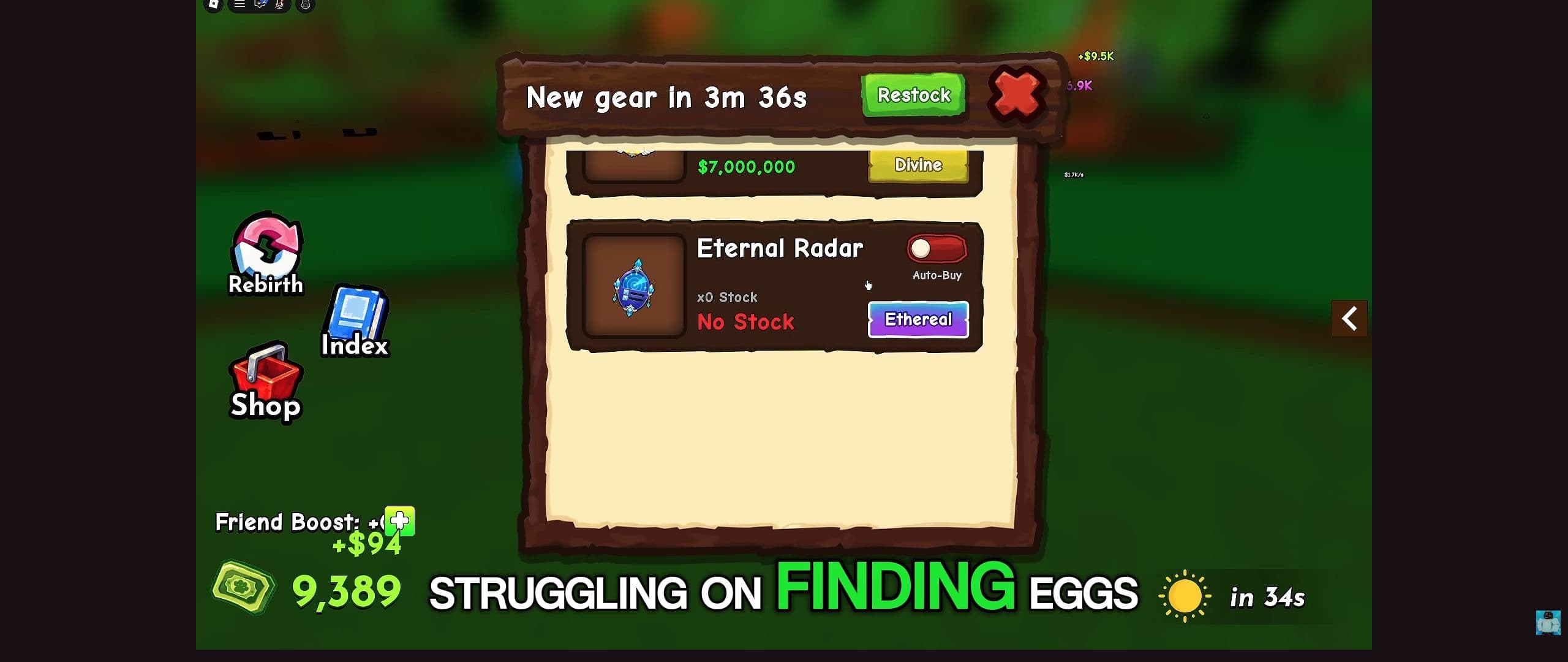
Start with the action that failed. A missing Ride prompt needs a different response from a full basket, and a choppy client needs a different response from a slow pet.
Use the matching section below before spending on another item or restarting an unfinished egg run.
| Problem | Start here |
|---|---|
| You cannot get onto or off a pet | Ride and Dismount |
| You bought a radar but cannot find a target | Radar and shop problems |
| You reached an egg but cannot collect it | Egg pickup |
| The carried egg is about to break | Returning with an egg |
| You reached your plot but have no new pet | Hatching |
| Your spendable cash is not increasing | Cash collection |
| The client stutters or will not connect | Technical help |
The Ride prompt is missing, or you cannot dismount
Close any menu covering the play area and approach the pet you intend to ride. On keyboard, use E when its Ride prompt is visible. On touch or controller, follow the displayed action.
If another pet or piece of scenery crowds the interaction, move to the side and face the intended pet again. If the pet is still in your list rather than on the plot, place it first.12
To get off, stop in an open area and use Dismount. Give the action a moment to register before pressing it again.
Compare the controls with SpaceQT's video at 0:05.
You bought a radar, but the hunt has not started
First check whether the radar is equipped. Buying it at Gears and activating it are separate actions. Equip it, look for Use Radar, and follow the marker after activation.3
If the problem is in the shop, read the stock line. For a sold-out item, use the restock countdown rather than repeatedly pressing its purchase button.
If an egg entry shows a luck requirement you have not met, choose another available target or address that requirement before spending on a different radar.
If a marker leads to an empty-looking spot, inspect the nearby terrain and read any target notification. Recheck Track when the target is gone instead of treating the old marker as a reserved egg.
Use ItzVexo at 5:45 to recognize the shop controls, or 5:35 for the egg list.
You reached the egg, but it will not enter your basket
Check Egg Basket first. If it is full, return to My Plot and process the egg you already carry.
With room available, stop beside the egg and center it in view. Use the pickup prompt, then check the basket before riding away. If the prompt is obscured, reposition beside the object instead of repeatedly passing over it.13
When the game names a requirement or gives an error, use that message to choose the next action. Buying another radar should not be your first response to a pickup problem.
Egg Will Break appears during the return
Head straight to My Plot and remove optional stops from the trip. The Egg Will Break warning is the countdown to watch while transporting the egg.3
If the egg disappears, inspect your basket and the plot's nests before starting a second search. Check what is actually present rather than assuming the delivery finished.
For the next attempt, choose a more manageable target or improve the return route. The speed guide covers mount choice and time lost along the way.
You are home, but the egg has not become a pet
Approach an available nest on your own plot and use Place Egg In Nest. If the game asks you to get off the mount, use Dismount and continue with the hatch prompt.2
Then match the next action to the screen:
- The egg is still in your basket: reposition beside the nest and try placement again.
- A hatch timer or progress display is active: follow that display until it finishes.
- The result has appeared: find the named pet in Pets before trying another hatch.4
If the result appears but the pet remains missing, capture that mismatch and the pet's name. Avoid deleting pets or repeating a paid action as an attempted repair.
A pet is placed, but your wallet is not growing
Look at the pet's $…/s field, any accumulated amount beside it, and your wallet. These displays answer different questions.
If the pet is absent from the plot, open Pets and place it. If earnings are accumulating beside it but are not reaching your wallet, approach it and use any collection action offered. If the wallet already rises, collection is not the step holding you up.5
If the problem continues, record the pet's name, its displayed rate, the wallet amount, and the message shown when you try to collect. Then use the cash guide to check the rest of your setup.
The upgrade looks better, but the run is not faster
First check the same movement field on both usable pets, then repeat one familiar route with the same carried-egg state. Do not compare one pet while empty and another while returning with an egg, or one direct route with another full of missed turns.
If the movement field improved but the route did not, look for collisions, overshooting pickups, climbing difficulty, or repeated detours before buying another upgrade. If the movement field did not improve, the new pet may still belong on the plot if its $…/s field is useful.
Use the speed guide for a controlled route check and the pet page when the question is which job the pet should take.
The whole game is choppy, delayed, or failing to connect
Choppy camera or low frame rate
Open the Roblox in-experience menu. On desktop, press Esc, then go to Settings. Switch Graphics Quality out of automatic mode if needed and lower the level.
Close unnecessary resource-heavy apps. These changes can help rendering performance; they leave the pet's in-game speed value unchanged.6
Players jump around or actions respond late
These symptoms can come from an unstable connection.6 Try a more reliable connection; a wired connection is useful when available.7
Before choosing to leave a server, finish a carried-egg delivery when possible. After reconnecting, check your basket and pet list before resuming the hunt.
The experience will not open
Check Roblox Status for a platform incident. If Roblox is having wider problems, wait for service recovery rather than changing your game setup.8
If the problem persists without a wider incident, follow Roblox's connection troubleshooting.
Common troubleshooting mistakes
Changing several things at once. Try the fix for the current symptom, then see whether that action works.
Restarting immediately while carrying an egg. Check whether you can finish delivery first.
Paying again because an interaction looks stuck. Check the result and account state before repeating a purchase.
When to send a report
For a game-specific problem, use a developer contact linked from the official experience or its creator page. For account, billing, or platform issues, use Roblox Support.
Include your device, operating system, approximate time and timezone, the action you attempted, and the exact error. Add a screenshot showing the relevant basket, pet, nest, or shop state.78
Keep passwords, account cookies, and payment-card details out of screenshots and public reports.
Return to the guide for your next action
Use the beginner guide to resume an egg run, or how to earn more cash to improve a working plot.
Version note — September 17, 2026: Button layouts, stock, requirements, and timers can change. Match the instructions to the controls and messages in your current session.
Watch the controls in context
Ride A Pet: a tour of the controls and collection Index
Video by SpaceQT
Use this walkthrough to recognize the ranch, riding controls and Index. The creator is playing on an established account.
Use YouTube’s Play button to watch here.
Playback starts in YouTube’s own controls. Selecting a different video does not play it. Reloading stops the current video.