
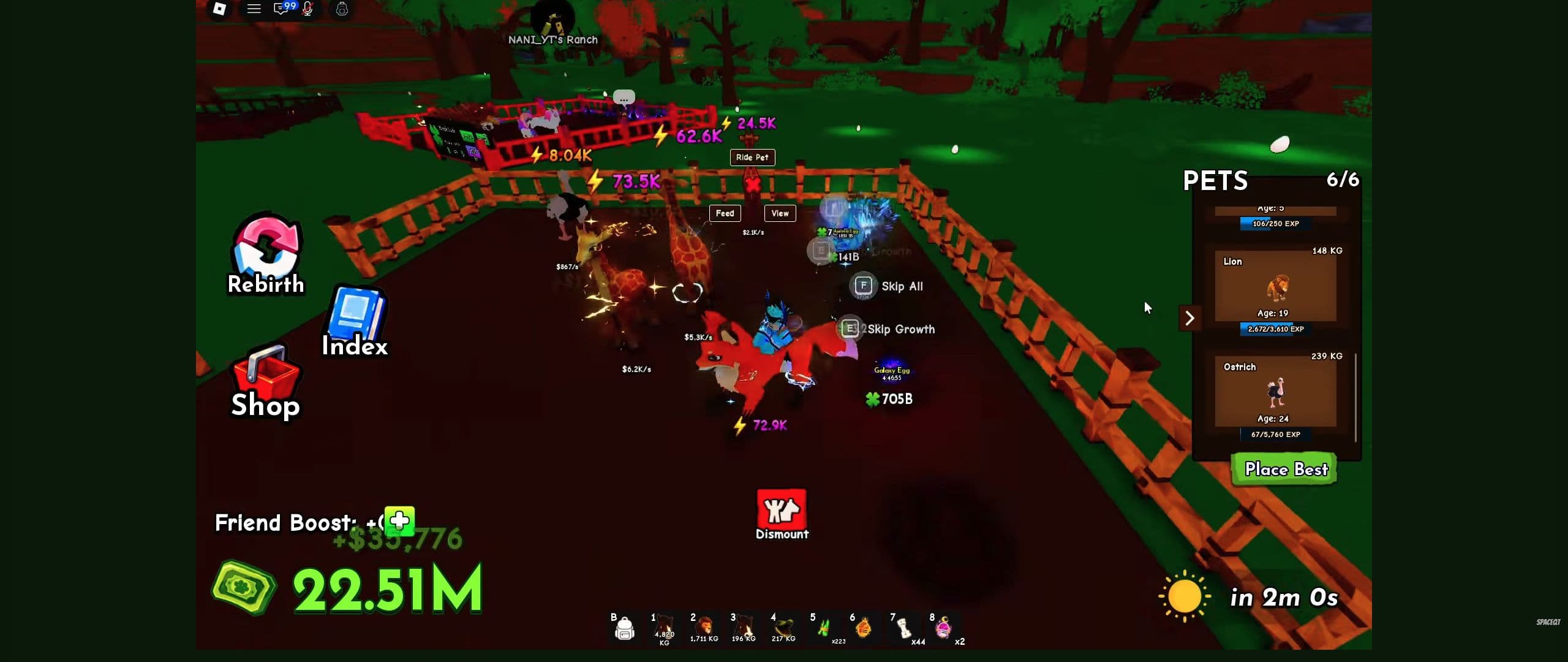
Carry the egg to your own ranch, use an available nest, and complete the hatch interaction. Then find the resulting pet in Pets. Reaching home is the delivery step; keep going until you have the pet.1
If your basket is full, finish this process before starting another hunt.
Head to your ranch with the egg still in your basket
Check the basket after pickup, then follow your own ranch marker. Your Ranch is visible in SpaceQT's recording at 0:05; guides also refer to the home destination as My Plot.
If Egg Will Break is counting down, go directly to the nest. Leave shopping and pet comparisons until afterward.1
If you arrive with an empty basket, inspect the nest area before assuming a hatch has started. A missing pickup and a hatch in progress need different fixes.
Move the egg into a nest
Approach an available nest and use Place Egg In Nest. If the game asks you to get off your pet, select Dismount, then continue with the hatch prompt.1
Keep the nest in view so you can see the egg being accepted. If the egg remains in the basket, move beside the interaction and try again. If the nest is occupied, use another available one or finish the existing hatch first.
- Egg in basket
- Egg accepted by nest
- Inspect the pet result
Finish each stage before starting the next hunt.
Worked checkpoint: what the 2:57 recording proves
The 2:57 frame is a useful mid-hatch checkpoint, not a complete outcome record. It shows Aurora Egg and Galaxy Egg already growing at a ranch, with Skip Growth and Skip All prompts visible. It does not show the earlier pickup, the Place Egg In Nest interaction, a completed paid skip, or the final pet that came from either egg.
Use it to verify that you reached the growth stage. For the steps on either side, follow the observable state changes: the egg must leave the basket and enter the plot's hatch flow, then the completed hatch must name a pet you can find in Pets. Keep the result name with the run if you are documenting a specific hatch; without that final screen, do not assign a pet outcome to the recorded Aurora or Galaxy egg.
Follow the egg's progress, not a universal timer
Use the timer, progress display, or hatch action shown for that egg. While processing continues, leave that interaction to finish rather than starting another purchase.2
An Instant Hatch offer is a separate spending choice. Read which action it covers before accepting; first establish that the egg has reached the ordinary nest interaction.
When the result appears, note the pet's name. Open Pets and find it. If a result appeared but the pet is missing, keep a screenshot of the result and follow hatching troubleshooting.
Check your discovery and choose the pet's job
Open Index: Pets after a new hatch. The Index also has Eggs and Mutations tabs; use the tab matching what you are checking.
Look at collection progress and any reward marked ready. Follow an available claim action before leaving, rather than assuming the progress display has already paid out.
The Index view at 3:40 helps you locate those tabs.
Before replacing your mount, compare the new pet's movement value. For plot placement, compare its cash-per-second field instead.3 Continue with getting faster or earning more cash, depending on what it improves.
Common mistake: leaving immediately after the hatch animation. Finding the result, checking collection progress, and choosing its role prevents useful pets from being overlooked.
Gameplay reference
Use these chapters to recognize the relevant controls. The recording illustrates the interface; follow the written steps for this task.
Ride A Pet: a tour of the controls and collection Index
Video by SpaceQT
Use this walkthrough to recognize the ranch, riding controls and Index. The creator is playing on an established account.
Use YouTube’s Play button to watch here.
Playback starts in YouTube’s own controls. Selecting a different video does not play it. Reloading stops the current video.