

Jump to the comparison tool to compare your own observations.
Use the job in front of you: travel, plot income, or a missing Index entry. A big number in one field does not make the pet best at the others. After a content drop, reread cards you already own before you replace a mount or a plot earner. The dated event window is on the update record.
Three questions before changing pets
| Your goal | What to compare | What to keep in view |
|---|---|---|
| Reach an egg and get home | The same route with each mount | Terrain, carrying state and visible modifiers |
| Improve plot earnings | The displayed dollar-per-second field | Which pets are placed and their current state |
| Complete the Index | Collected and missing entries | Pets, Eggs and Mutations are separate tabs |
This separation avoids a common mistake: treating an impressive number in one field as proof that the pet is best at everything.
A new hatch is a candidate. It is not automatically better.
Read the labels on your own pet
The recorded gameplay shows a Lion and multiple Giraffes at a plot, with different values visible beside them. That is a reason to compare the actual pet in your account rather than copying a number from someone else's video.
Keep the name, visible modifiers and unit with any number you write down. Do not remove the unit when comparing a movement label with a dollar-per-second rate. An unmeasured stat remains unknown; it should not be entered as zero.
Before replacing your mount
Choose two familiar landmarks and ride between them. Use the same path for the second pet and note whether you are carrying an egg. If the faster-looking pet loses time on the turns or terrain, improve the route before buying another upgrade.
Keep an available mount until the replacement is ready to use. A reveal animation or a pet silhouette is not the same as having the pet ready in your own collection.
The get faster guide explains the full comparison. For money, follow the cash guide instead of using travel speed as an income ranking.
Use the Index as a collection checklist
Open Index: Pets to see the pet collection view. The recorded screen shows colored entries, locked silhouettes and a progress bar beneath the grid. Switch to Eggs or Mutations when you want to track those collections.
Named pets: what the current evidence supports
| Name | Recognition | Acquisition evidence | Performance evidence | What you can do now |
|---|---|---|---|---|
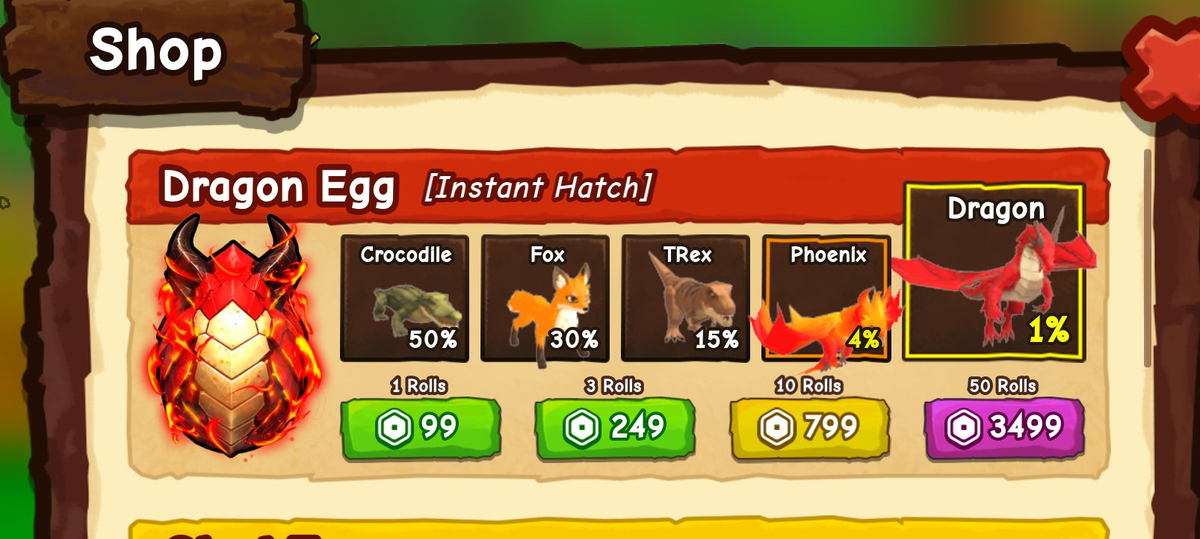
| Phoenix | Featured in official Ride A Pet promotional artwork. | A published Dragon Egg [Instant Hatch] Shop screenshot lists Phoenix at 4%; recheck the current offer. | No controlled Phoenix speed or income comparison is supplied. | If you own one, record its live movement and cash fields under the same conditions as the pet you are comparing. |
| Lion | Visible in recorded ranch and Pets screens. | The recording proves ownership on that account, not a species-wide hatch source. | The screen provides individual labels only; it does not establish species base stats. | Use it as an example of how to read a pet card, not as a universal benchmark. |
| Ostrich | Visible in the recorded Pets screen below. | The recording does not establish its acquisition source. | Age, KG and EXP are visible for that individual card. | Keep those fields separate from movement and $…/s when comparing a job. |
| Fox | Searched as “how to get fox in ride a pet”. | Not published as of 2026-09-19. Some third-party Dragon Egg shop lists include Fox. | No Fox stats card or Fox page on this site. | If you own one, compare its live movement and cash-per-second fields below. |
The same Shop screenshot lists Dragon at 1%. These percentages describe the captured offer reviewed on September 18, 2026, not a current price or an exclusive acquisition route. Read the Dragon Egg pool and purchase checks before spending. Species-wide movement and income values for those pets are not published as of 2026-09-19.
Fox
If a Fox is already in your Pets list, compare its live movement and cash-per-second fields in the tool below. Third-party Dragon Egg shop write-ups mention Fox in a mixed reward pool. Recheck that offer in the Dragon Egg guide before you spend.
Can this pet be ridden?
Use the interaction on the pet you own. When Ride appears beside the pet and mounting changes the control to Dismount, that pet is available as a mount in the current state. A name, silhouette, or promotional image does not establish ride availability by itself.
For a travel decision, compare the movement field only after both pets are actually available to ride. For plot income, compare the $…/s field instead.
Age, weight and income are separate readings
In the Pets panel, Age, KG and EXP are shown separately. A level or a large body is not a cash-per-second unit. The example below shows Lion and Ostrich entries on one player's account; the ages and weights describe those particular pets.
| Recorded pet | Weight label | Age label | EXP shown |
|---|---|---|---|
| Lion | 148 KG | 19 | 2,672 / 3,610 |
| Ostrich | 239 KG | 24 | 67 / 5,760 |
These are the two individual cards in the 2:57 frame above. The age label does not establish a real-time unit, and neither card establishes a species-wide speed, hatch source or income rate.
For a useful before-and-after check, keep the pet, route and carried load the same. Record its labels before feeding or changing a modifier, then repeat the observation. Do not infer an age-to-speed formula from a single screenshot.
Compare your recorded values
Compare your pets
Enter two or three pets. Compare income, route time, or both. Leave anything you have not measured empty.